
25 Ways to Use AI Agents in a Small Business
Daniel Cho · October 18, 2026
Most small businesses do not need an autonomous employee. They need a reliable way to hand off the work that eats the week: the brief nobody writes, the inbox nobody triages, the proposal that gets drafted at 11pm.
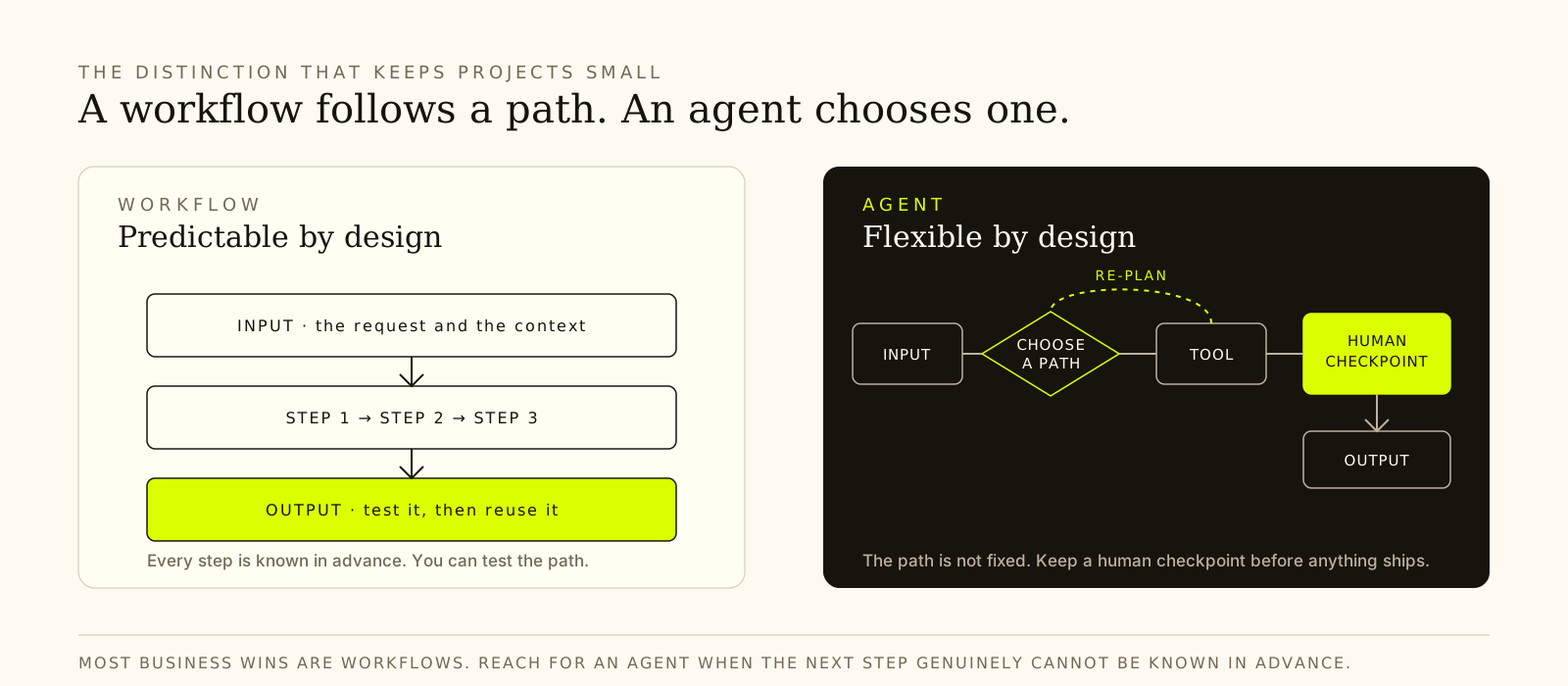
That is the useful frame for AI agents. An agent can choose a tool, take a step, look at the result, and decide what to do next. A workflow follows a path you already know. Most of the value in a small business sits in the second category — and most of the risk sits in the first. We unpack that distinction in Agents vs. Workflows.
The question is not “what can an agent do?” It is “what am I willing to check?” These 25 workflows are organised by the part of the business they serve. Each one names the inputs it needs, the request that works, the output you should expect, and the check that catches the failure.
How to read the risk level
Every workflow below falls into one of three modes. The mode matters more than the model.
- Paste-in. You supply the notes, numbers or documents. The agent reads only what you give it. Lowest risk, easiest to verify, and where most owners should start.
- Connected. The agent reads a live system — email, calendar, store, accounting. The connector is now part of the risk surface. Add one connection at a time.
- Write-access. The agent can change a record, send a message or publish something. Approval and a post-action check are mandatory. “Done” in a chat window is not evidence.
Most of this list is paste-in on purpose. A workflow that works from supplied information is easier to test, easier to repeat, and much easier to walk back.
Where to start
Pick a job you already do every week, where you hold the information, and where you would recognise a bad result immediately.
- If you end the week unsure what moved: #1, the weekly business brief.
- If client work eats your evenings: #5, meeting preparation or #16, the proposal draft.
- If marketing is the bottleneck: #11, the weekly content plan.
- If you run a store: #22, product descriptions.
- If money is owed to you: #10, the invoice reminder.
Then work down this page in order of how badly a quiet mistake would hurt. A stale competitor price is annoying. A support reply that says an order was checked when it was not is a different kind of problem.
Planning and everyday administration
1. Build a weekly business brief
Useful for: the owner who ends the week with a full calendar and no clear answer to “what actually moved?”
Give it: your goals for the quarter, this week’s updates, deadlines, anything stuck, and the numbers you already trust. If the notes are long, keep the raw numbers and summarize the history — the model only works with what fits in its context window. Understanding LLMs covers why that matters.
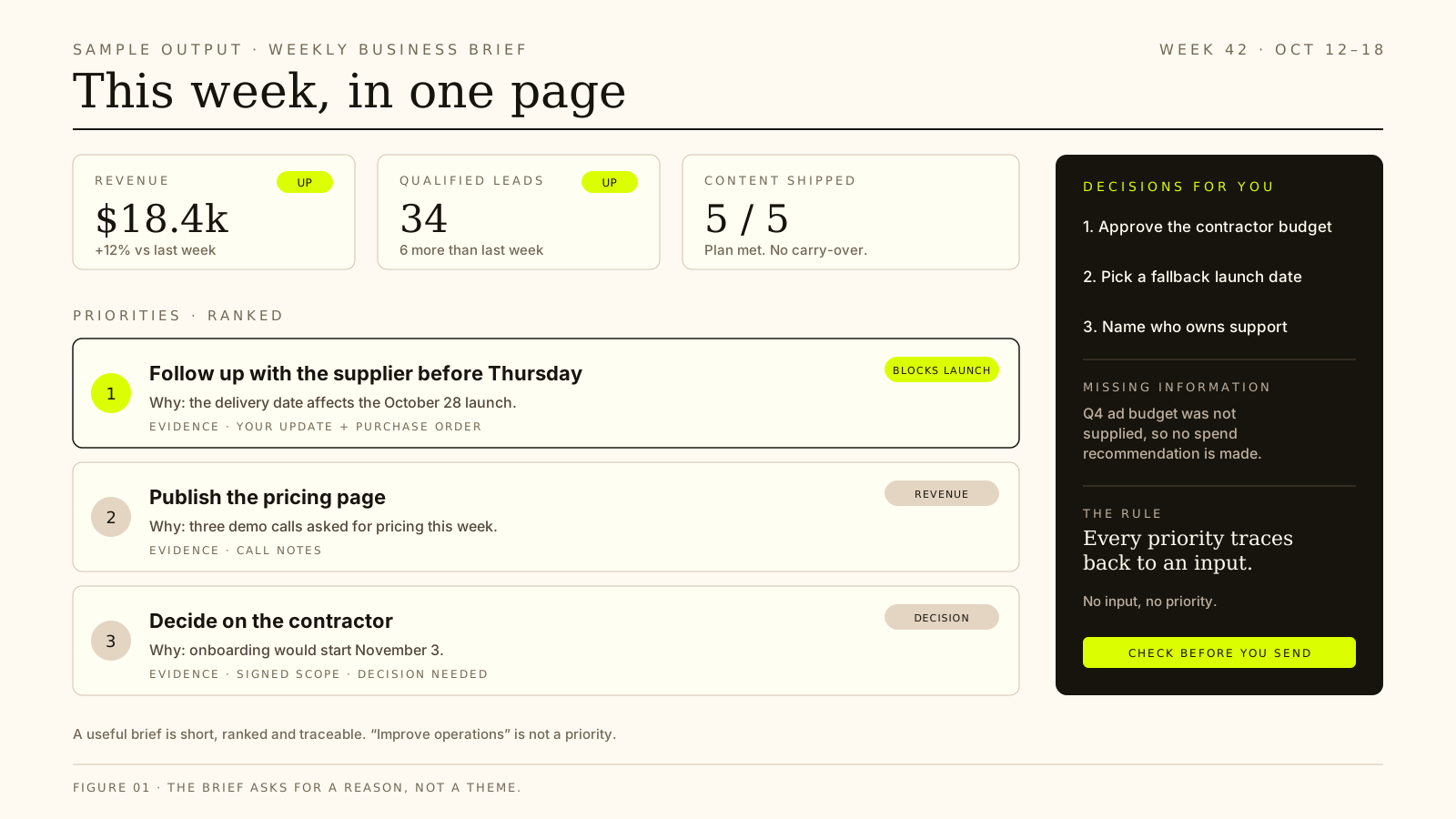
Ask for: what changed, the priorities that need attention, and the decisions that are yours. Require a reason and an evidence line for every priority. Ask it to separate facts from assumptions and to name missing information instead of filling the gap.
Check: that each priority traces back to something you supplied. “Improve operations” is filler. “Follow up with the supplier before Thursday because the delivery date affects the launch” is a priority.
Use the business updates below to prepare my weekly brief.

Identify what changed, the priorities that need attention, and the decisions
I need to make. Tie each priority to the evidence behind it, separate facts
from assumptions, and finish with my next actions.

Ask about missing information rather than inventing it. Keep the brief under
400 words and rank the priorities.

Business updates: [paste your notes]
2. Turn a messy inbox into a triage queue
Useful for: an inbox you have stopped opening, or a Monday morning that disappears into email.
Give it: a batch of 20–30 messages — sender, subject, date, and the first few lines. Do not connect the inbox on day one. Start with a pasted export so you can see how it sorts before you grant access.
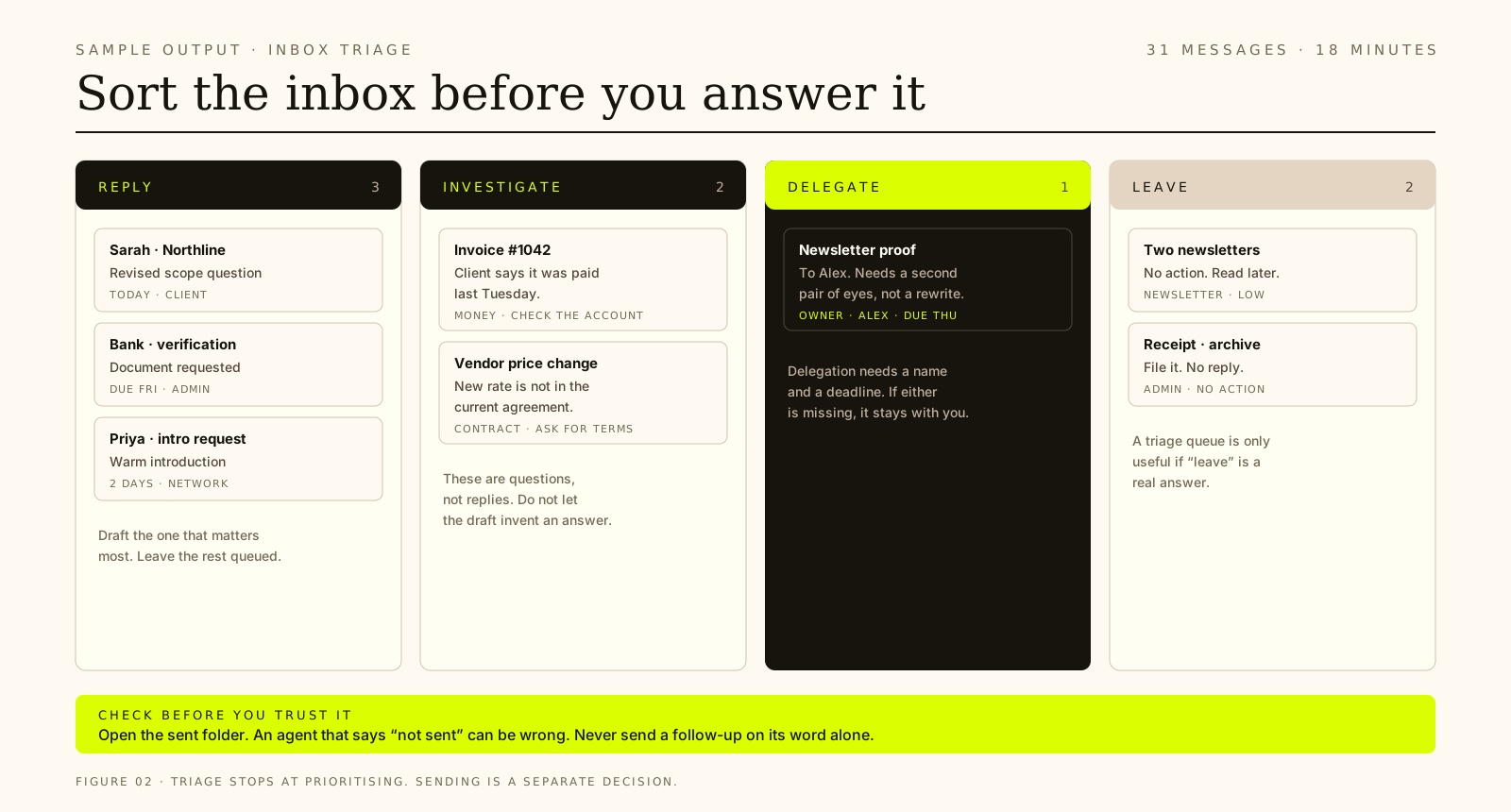
Ask for: four buckets — reply, investigate, delegate, leave — with a one-line reason for each. Ask it to flag anything it is unsure about separately, and to draft only the reply that matters most.
Check: the sent folder, the thread order, and whether a deadline was genuinely stated. An agent can tell you an email was not sent when it was. That mistake leads to an unnecessary follow-up, which is why this workflow stops at prioritising.
3. Turn meeting notes into decisions and actions
Useful for: the hour after every client call, when the notes are fresh and the follow-up is already late.
Give it: your notes or transcript, who was in the room, and the purpose of the meeting.
Ask for: decisions made, tasks with an owner and a date, unresolved questions, and a short follow-up draft. Require it to mark anything that was discussed but not decided.
Check: that discussion has not been promoted into a decision, that unassigned tasks stay unassigned, and that no deadline appeared from nowhere. Then send the follow-up yourself.
Turn the notes below into a meeting record.

Separate: (1) decisions actually made, (2) tasks with an owner and a date,
(3) open questions, (4) items that were discussed but not decided.

Do not assign an owner or a deadline that is not in the notes. Mark gaps as
[unassigned] or [no date]. Finish with a short follow-up email I can edit.

Meeting purpose: [one line]
Attendees: [names and roles]
Notes: [paste]
4. Write the SOP you keep explaining verbally
Useful for: the point where you start delegating, and realise the process lives in your head.
Give it: how the task actually works today, including the bits you do from memory, the tools involved, and the exceptions you handle without thinking.
Ask for: a procedure with numbered steps, decision points, a completion check, and a short list of failure modes. Ask where a new hire would most likely get stuck.
Check: that the edge cases you mentioned survived. Those are what the procedure exists for. Delete any step the agent invented to make the document look complete.
5. Prepare a client meeting brief
Useful for: consultants, agencies, and anyone walking into a call half-remembering the last one.
Give it: the meeting, the client, and the sources it may read — a thread, a document, a calendar entry. If you are pasting, paste the actual history rather than a summary.
Ask for: the purpose, relevant history, open questions, decisions to prepare for, and a source for each factual claim. Ask it to list what it could not confirm instead of filling the gap.
Check: right person, right meeting, current information, and no invented commitments. Verify any detail you plan to say out loud against the original thread.
Prepare me for the meeting below.

Give me: the purpose, the relevant history, the open questions, and the
decisions I should be ready to make. Use only the sources I name. Quote the
thread or document a detail came from. List anything you could not confirm
instead of filling the gap.

Meeting: [who, when, what it is about]
Sources you may read: [threads, documents, calendar]
Research, reporting and finance
6. Compare competitors on criteria you choose
Useful for: deciding how to describe what you sell, or where a crowded market has room.
Give it: the decision you are making, the competitors in scope, and the criteria that matter — price, positioning, audience, service model, proof.
Ask for: a comparison on consistent criteria, a clear note on what is missing, and a separation between what was published and what you are inferring.
Check: source dates, quoted terms, and whether the conclusion follows from the evidence rather than the confident tone. A published price is a fact. “They are moving upmarket” is a guess.
7. Research a software purchase with sources
Useful for: choosing a tool, a supplier, or a service without losing a day to tabs.
Give it: one specific question, your actual requirements, your budget, your constraints, and the sources it may use.
Ask for: a recommendation with sources, the trade-offs, what remains unknown, and the date on anything involving price or features. Ask for a short brief you could hand to a partner.
Check: that the recommendation follows your requirements rather than the vendor’s marketing. Prices and feature sets change; confirm anything you are about to pay for.
Research the decision below.

Recommendation first, then the trade-offs, then what you could not confirm.
Cite a source and a date for every price or feature claim. Separate vendor
claims from independent evidence. If my requirements conflict, say so
instead of picking one silently.

Decision: [one question]
Requirements: [must-haves, nice-to-haves]
Budget and constraints: [numbers, time, team]
8. Turn customer feedback into themes
Useful for: knowing what to fix first without reading every review twice.
Give it: real reviews, survey answers or support threads. Include the source and the date range if you have them.
Ask for: recurring problems, positive themes, a representative quote for each, how often each theme appears, and the improvements worth considering.
Check: that you can find every quote in the source. One loud customer is not a theme. A theme needs repetition, and the useful version is usually uncomfortable and specific.
9. Turn monthly numbers into next month’s questions
Useful for: the first Monday of the month, when the figures exist but the meaning does not.
Give it: a defined set of figures, the definitions behind them, the period covered, and notes on what happened.
Ask for: what changed, candidate explanations labelled as hypotheses, what deserves investigating, and the questions you should ask before acting.
Check: complete periods, consistent definitions, and the arithmetic. If the workflow reads from connected accounting software, the permission model matters; if it works from pasted numbers, it has no accounting access at all.
10. Draft an overdue invoice reminder
Useful for: money you are owed and have been too polite to chase.
Give it: the verified unpaid invoice, the relationship, any previous messages, and the tone you want to keep.
Ask for: a reminder that fits the relationship, with accurate figures and one clear next step. Ask for a short version and a firmer version, so you can choose.
Check: that the payment has not already arrived. Check the amount, the invoice number, and the recipient. Drafting is the deliverable here; sending is a human decision, every time.
Social media and content marketing
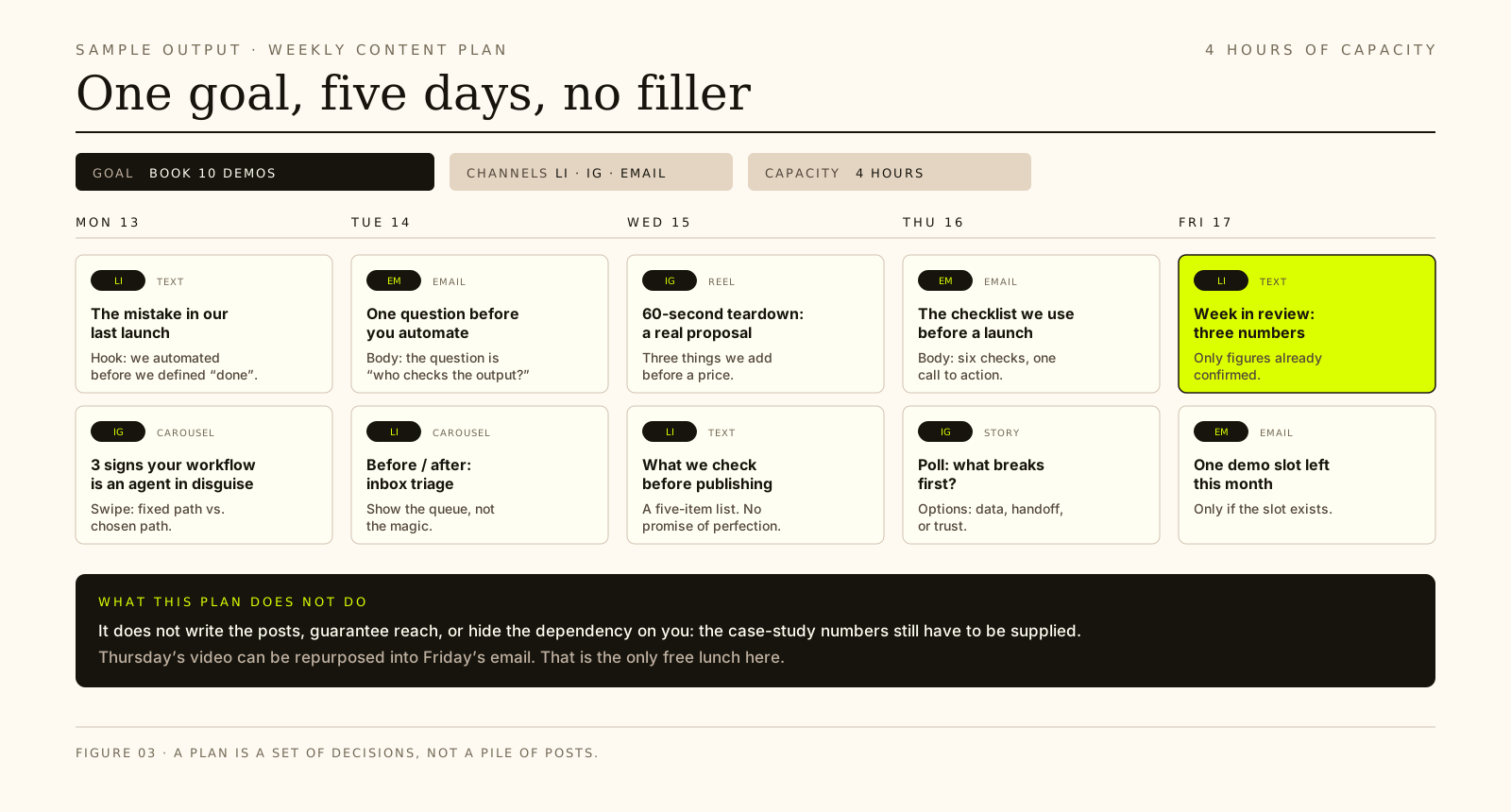
11. Plan a week of content around one business goal
Useful for: replacing “what shall I post today?” with a plan you can actually finish.
Give it: one objective, your channels, the hours you really have this week, what you can deliver without help, and any verified findings from the previous workflows.
Ask for: a calendar where each slot has a channel, format, angle, hook and one call to action. Keep the whole week inside your stated capacity. Mark anything that depends on information you still need to supply.
Check: that the workload fits the hours, that nothing promises a result the agent cannot support, and that the plan is a set of decisions rather than a pile of posts.
Build one week of content around the goal below.

For each slot give me: channel, format, angle, hook, and one call to action.
Keep the whole week inside the capacity I give you. Say which items depend on
something I still need to supply. Do not promise reach, leads or sales.

Goal: [one business goal]
Channels: [where you post]
Capacity: [hours you actually have this week]
What I can deliver: [text, video, images, none]
12. Repurpose one article into five formats
Useful for: getting more out of work you already did.
Give it: the existing article, transcript or teaching resource, plus the audience and channels you are adapting it for.
Ask for: a short social post, an email excerpt, a video outline, a carousel script, and a one-line hook — while keeping the useful ideas intact.
Check: that the adaptation did not quietly drop the caveat that made the original honest. Links, numbers and names are where repurposing goes wrong.
13. Draft social posts that sound like you
Useful for: posting consistently without sounding like a generic AI account.
Give it: 5–10 samples of your own writing, the audience, the platform, and the goal of the post.
Ask for: a short voice guide, then three drafts with different angles. Ask it to name the choices it made so you can correct the voice rather than just the wording.
Check: that the specifics survived. The tell of generic copy is not bad grammar; it is the absence of names, numbers and opinions you actually hold.
14. Build a brand voice guide the agent can follow
Useful for: making every future draft start closer to the mark.
Give it: samples, banned words, audience, and examples of writing you like and dislike — including the reasons.
Ask for: a one-page guide with do and don’t rules, sentence patterns, vocabulary, and two annotated examples. Ask it to describe how you write, not how it thinks you should.
Check: that the guide is descriptive rather than aspirational. Test it on a real post before you save it. A voice guide that nobody can apply is a mood board.
15. Audit a landing page before you rewrite it
Useful for: a page that gets traffic but not action.
Give it: the page copy, the audience, the offer, and any real analytics you have. Paste the copy; do not assume the agent browsed it correctly.
Ask for: message match, section order, proof gaps, CTA clarity, and the objections a buyer would still have after reading.
Check: that every recommendation traces to something on the page. Do not let it invent conversion benchmarks or claim to know why visitors left when you have no data.
Sales and customer service
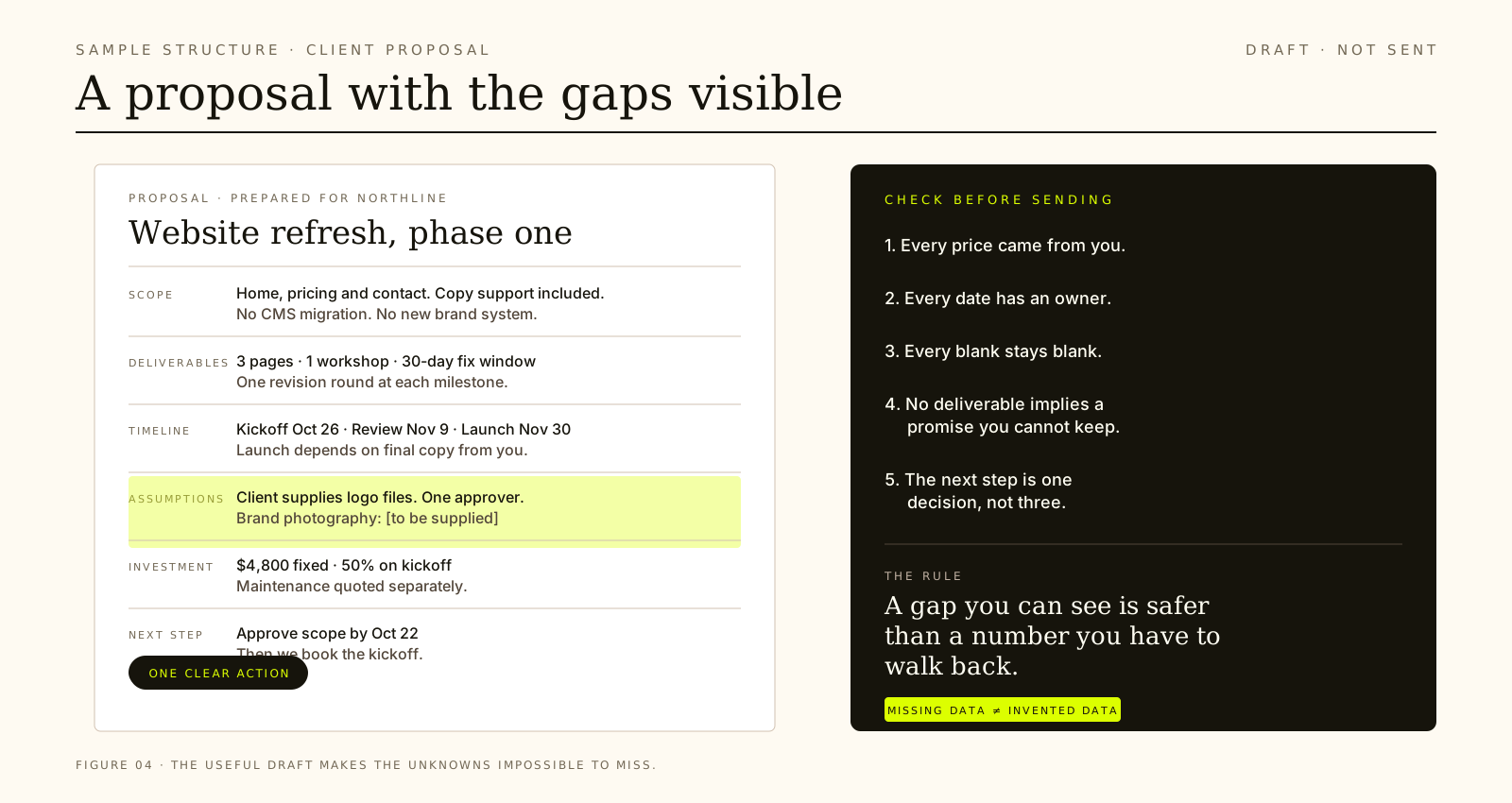
16. Draft a proposal from discovery notes
Useful for: service businesses losing evenings to proposals.
Give it: what the client needs, what you agreed, your confirmed pricing, your delivery approach, and the assumptions you are making.
Ask for: scope, deliverables, timeline, assumptions, investment and next step. Require missing commercial details to appear as blanks, not plausible guesses.
Check: that no commercial detail was invented. Every date should have an owner, every deliverable should match what you can actually produce, and every blank should stay blank. If you are still setting the price itself, our pricing framework for solo operators is the place to start.
17. Follow up with a quiet prospect
Useful for: the proposal that went quiet, and the follow-up you keep postponing.
Give it: the real thread, what you last sent, when you sent it, and the next step you want.
Ask for: a short note that acknowledges where you left off and offers one useful next step. Better than “just checking in” is a specific reason to reply.
Check: the facts about what you actually sent and when. Do not let the draft imply they replied, agreed, or asked for something they did not.
18. Build a client onboarding pack
Useful for: the week after someone says yes, when the details are scattered across three documents.
Give it: the signed scope, client details, timeline, who owns what, and the tools you use.
Ask for: a welcome message, intake questions, a kickoff agenda, milestones, and a short responsibilities list for both sides.
Check: that the milestones match the scope you actually sold. This is a common place for extra promises to appear because the draft wants to sound generous.
19. Draft customer support replies from your policies
Useful for: the same five questions, forever.
Give it: the customer’s question, the policy that applies, the verified order facts, and the tone you want.
Ask for: a clear reply, anything missing that you need to check, and an escalation note for any exception that requires your decision.
Check: that a written reply is not mistaken for action. A drafted message saying an order was checked is not a checked order. Refunds, cancellations and account changes stay with a human.
20. Prepare a sales call brief
Useful for: a discovery call where you want to ask better questions instead of reading a script.
Give it: the prospect, the source material you have, the goal of the call, and any prior notes.
Ask for: a company snapshot, a problem hypothesis clearly labelled as a hypothesis, five open discovery questions, likely objections, and one next step to aim for.
Check: the facts, the names, and the dates. Then throw away the hypothesis if the conversation contradicts it. The brief is preparation, not a script.
Websites, online stores and email marketing
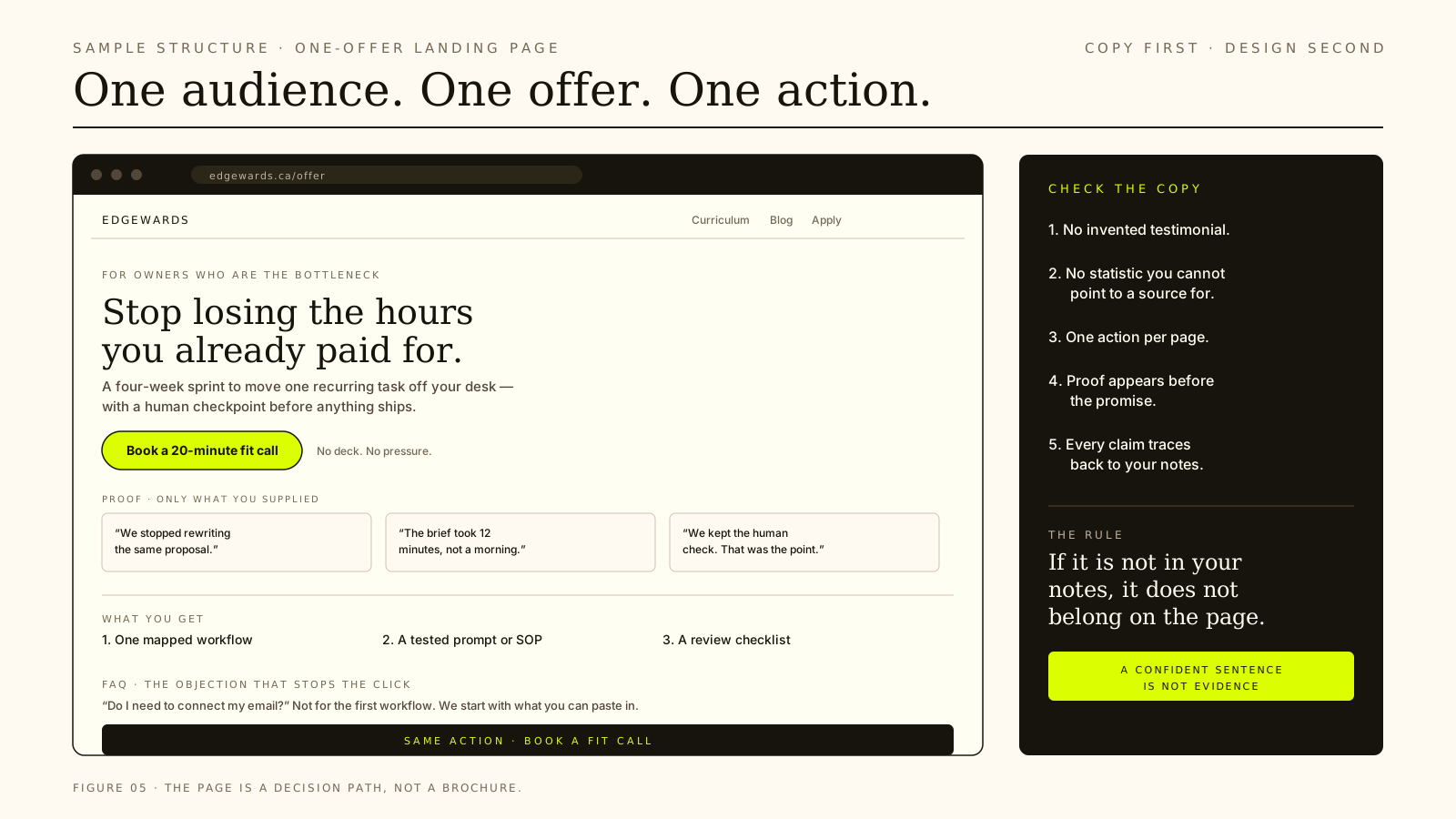
21. Write a landing page for one offer
Useful for: one audience, one offer, one action.
Give it: who it is for, what they get, the outcome, the proof you actually hold, the objections you hear, and the action you want.
Ask for: the page’s message, section order, copy, CTA, and a short FAQ. Require it to use only the proof you supplied. Ask it to list any claim it could not support.
Check: that no testimonial, statistic or guarantee appeared from nowhere. A confident sentence is not evidence, and a page that sounds certain can still be wrong.
Write the copy for a one-offer landing page.

Use only the audience, offer, proof and objections below. Do not invent a
testimonial, statistic, guarantee or deadline. If a section needs proof I
have not supplied, mark it [proof needed] instead of writing around it.

Give me: the core message, section order, the copy, one call to action, and
a short FAQ. One action on the page, not three.

Audience: [who it is for]
Offer: [what they get]
Outcome: [what changes for them]
Proof: [what you can actually support]
Objections: [what they say before they buy]
22. Improve product descriptions without inventing claims
Useful for: a catalogue written in a hurry, or a product page that answers none of the buyer’s real questions.
Give it: the verified specifications, the questions buyers keep asking, the shipping and returns facts, and your brand voice.
Ask for: a before-and-after rewrite that answers those questions without adding claims. Ask for the search terms a buyer would actually use, kept natural.
Check: materials, dimensions, compatibility, care instructions and stock status against the source. Then check whether the text stayed a draft or was written to the live product.
23. Review inventory that needs a decision
Useful for: stock decisions you keep postponing.
Give it: real quantities, your reorder thresholds, lead times, seasonality, and any cash constraints.
Ask for: an attention list — which items need a decision, why each one appears, the suggested action, and the cash impact. Ask it to flag anything it cannot judge from the data.
Check: that the thresholds are yours, not invented defaults. Verify counts against the system. For a first run, keep it to reviewing and proposing rather than changing anything.
24. Draft a customer newsletter
Useful for: a list you have been neglecting, or a month with nothing new to say.
Give it: the audience, approved updates, one objective, the destination links, and any offer that is genuinely live.
Ask for: three subject lines, preview text, the body, one call to action, and a plain-text version.
Check: that every link resolves, every claim is approved, and nothing date-sensitive is stale. A newsletter is a promise to a list; the draft is not the send.
25. Find inactive customers and plan a win-back
Useful for: revenue you already earned once.
Give it: what “inactive” means for your business, who to exclude, the customer history you have, whether there is an offer, and the tone you want.
Ask for: a defined segment with the criteria written out, a reason to come back that is not only a discount, a short sequence, and the suppression rules.
Check: the exclusions, the consent, and the people who asked not to be contacted. Then check the audience before sending. A win-back message to the wrong segment is worse than no campaign.
Which one should you try first?
Start with a job you already do every week, where you hold the information, and where you would spot a bad result at a glance. That last condition matters most.
A sensible order for most owners:
- The weekly business brief (#1). It teaches you how the agent handles your context, and the output is easy to judge.
- Meeting preparation (#5). The value is obvious, and the failure mode — a wrong detail — is easy to catch before the call.
- The content plan (#11). It saves a real planning session without writing or publishing anything.
- The proposal draft (#16). Higher stakes, but still a draft you review before it leaves your desk.
- Anything with write-access last. Publishing, sending, changing records, moving stock. Earn your way there.
If you only do one thing this month, do #1. It is the cheapest way to find out whether the agent is useful with your actual business, rather than a demo business.
The four checks that catch most failures
Before you use any output, check these. They are boring on purpose.
- Dates and prices. Confirm the number and the date. Models are equally confident when they are wrong.
- Commitments and names. Who agreed to what, and who is it addressed to? A draft can invent a promise you now own.
- Action versus draft. Did it write the message, or did it send it? Did it propose the change, or make it? The difference is the whole risk.
- Arithmetic. If it calculated a ratio, a total or a saving, redo the sum. The explanation can be right while the number is wrong.
Turn a good result into a repeatable workflow
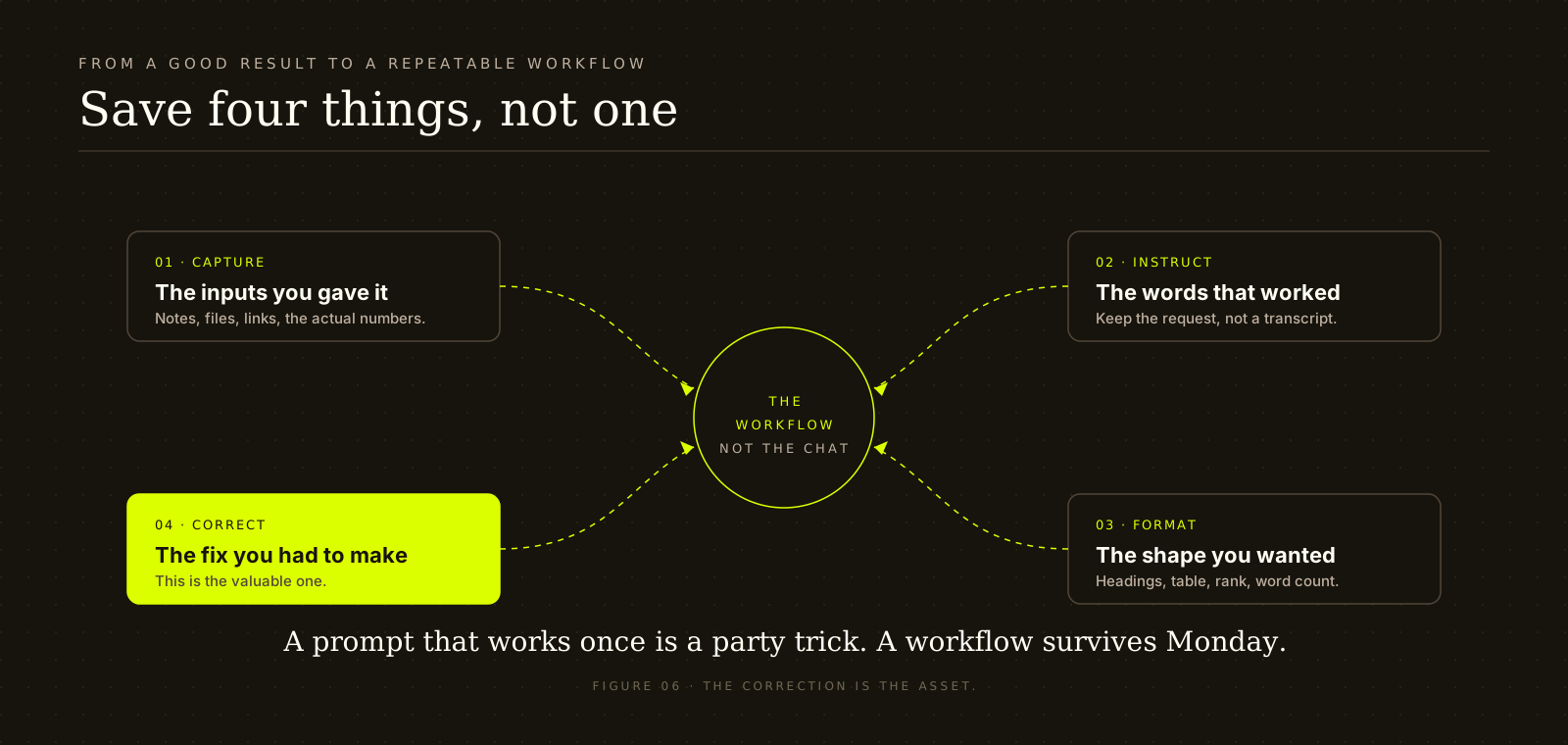
When something works, save four things: the inputs you gave it, the instructions you used, the output format you wanted, and the correction you had to make.
The correction is the valuable one. It is the difference between a prompt that works once and a workflow that works every week. Write it down in plain language: “It keeps inventing a deadline; tell it to use [no date] instead.” That sentence is worth more than another twenty prompt templates.
Run the workflow manually for two weeks before you schedule it. A recurring task is an automation, and an automation that fails quietly is worse than a task you remember to do. If the workflow needs a live system, the connection is the next decision — MCP is the common shape for exposing tools and data to a model. Connect one thing at a time. For the underlying idea, see What Is MCP, and Why Should You Care?.
Frequently asked questions
Do I need an agent, or a workflow?
Start with a workflow. If the steps are known in advance, a fixed sequence is easier to test, cheaper to run, and simpler to hand to someone else. Reach for an agent when the next step genuinely depends on what the last step found.
Can an agent run my inbox or calendar?
It can read and sort what you give it, and a connected tool can reach further. But “can” is not “should.” Start with a pasted batch, verify the triage against the real inbox, and keep sending as a human decision until you have a reason to trust the workflow.
What should I never let it do unattended?
Send money, change a price, publish to a live page, contact a customer list, or make a commitment on your behalf. If an action is hard to reverse, it needs a human checkpoint. That is not a limitation of the technology; it is a design choice.
How do I stop it inventing things?
Give it the source material, name the allowed sources, and ask it to list what it could not confirm. Then check the specific things that matter: dates, prices, names, quotes and commitments. “Ask it not to hallucinate” is not a control. A verification step is.
Which tool or model should I use?
The one you can verify most easily. A general assistant that reads files you attach and searches the web is enough for most of this list. The workflow matters more than the brand. If you need a live connection, check the current permissions and data terms before you connect a client system.
Is client data safe to paste in?
That depends on your agreement, the tool’s retention settings, and whether your client has consented to that processing. Check the current terms rather than assuming. If you cannot answer the question, do not paste the data. Use a redacted version for the first run.
How this guide was written
These are workflows we teach in EDGEWARDS cohorts and use in our own work. We have not labelled entries as “tested” because a workflow working in one business is not proof that it will work in yours. Where an entry needs a connected app, we say so. No vendor feature claims are made here; check the current documentation before relying on a connector, and treat every output as a draft until you have checked it.
Last reviewed October 18, 2026.
Want to build one of these with feedback instead of guessing? The next cohort works through LLMs, agents, MCP, web design and the business side of running a solo AI practice. Apply for the next cohort or see the curriculum.